Parents are the contact
Messages concerning children go to adult guardians. The audience tools keep the people responsible for each player connected to the league.
Family communications
Keep families connected to registration, their teams, and the schedule without making volunteers relay every update.
From setup to game day
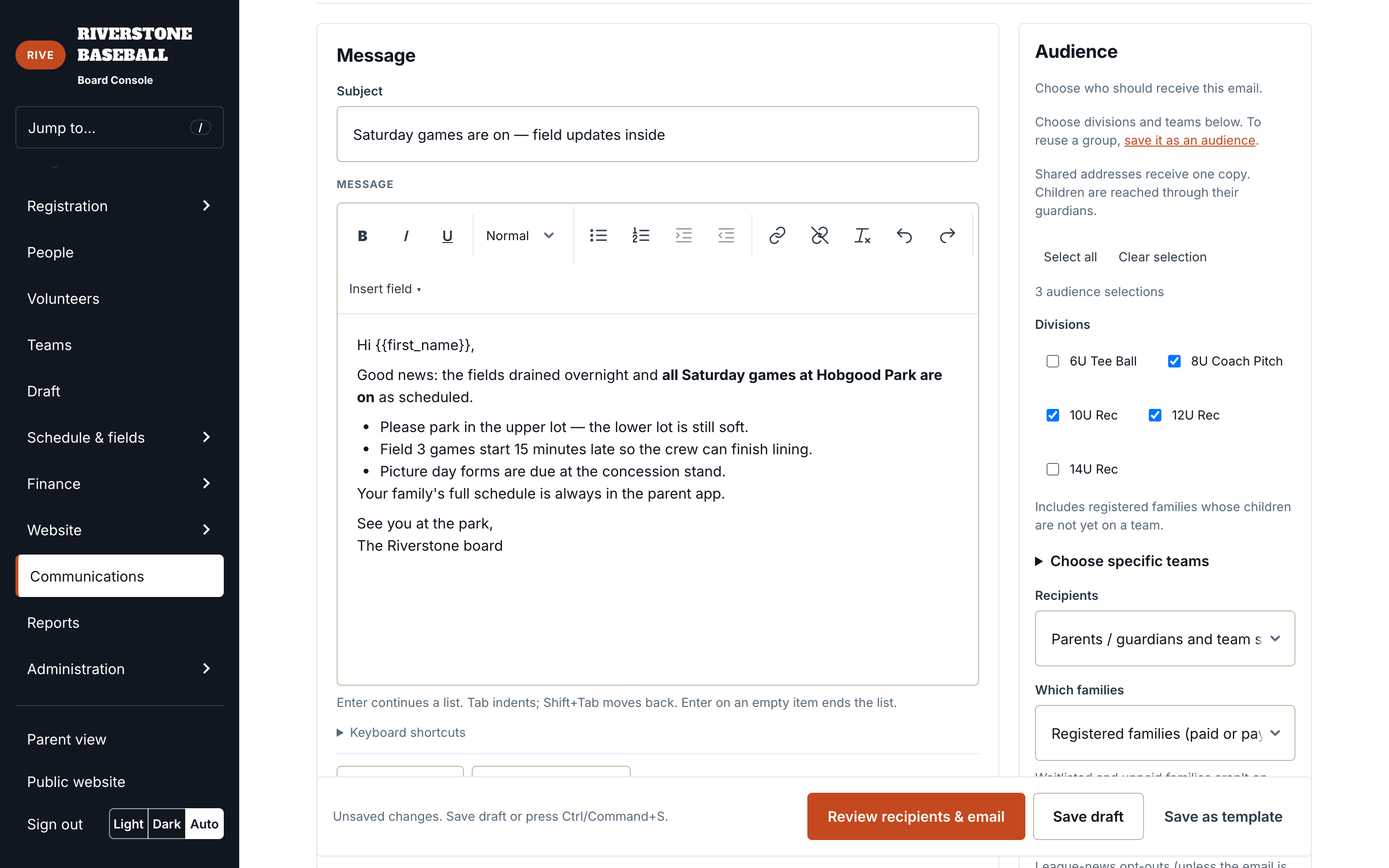
Select divisions, specific teams, or both, then choose parents and guardians, team staff, or both groups. Division audiences can include registered families whose children are not on a team yet. Shared adult email addresses are deduplicated so the same message is not sent repeatedly to one inbox.
Add a subject, message, and reply-to address. Save a draft when you need another board member’s input, or save a reusable template for the next season. The review screen shows the message and the unique adult recipient count before sending. You can send one test email to check it first.
Send after review or schedule the message for later in the league’s timezone. Scheduled audiences are recalculated at send time. Newsletter preferences and suppressed addresses are respected, while required roster communications have their own workflow. Registration and published schedule changes also have event-specific notifications.
Messages concerning children go to adult guardians. The audience tools keep the people responsible for each player connected to the league.
Choose a reply-to email so questions return to the right person. A reviewed message is easier to hand off than a group text someone else cannot see.
Drafts, scheduled messages, and templates have separate views. Common announcements can start from a template instead of a blank page.
Tell us which messages take up the most time during your season.